Candidate relationship management: how recruiting teams build and keep relationships with candidates
What it involves, what to send between roles, the main types of candidate CRM, examples, metrics and how it works with an ATS.

What is candidate relationship management?
Candidate relationship management is how a recruiting team builds and keeps relationships with candidates before, during and between open roles: relevant contact, useful updates and the right opportunity at the right time. A candidate relationship management system supports this work.
- Relationships firstThe base, notes and reminders exist to keep conversations relevant over time.
- Between roles is the real workWhat a team sends when nothing is open decides who answers later.
- Widely adopted47% of US HR recruiters and managers use a CRM for recruiting (Employ survey, 2025).
- CRM and ATS overlapMany platforms combine both; the difference is mainly focus.
- 1DiscoverSourcing · Referral · Event · Inbound
- 2ConnectFirst conversation
- 3LearnGoals · Timing · Preferences
- 4SegmentTalent pool
- 5Stay in touchRelevant updates between roles
- 6MatchThe right role at the right time
- 7Hire or returnBack to the pool with new context
After step 7, the cycle returns to step 5.
What is candidate relationship management?
Candidate relationship management is the practice of building and keeping relationships with people a recruiting team may hire, before, during and between open roles. It covers how a team finds and approaches people, learns what they want, stays in touch when nothing fits yet, and comes back with the right opportunity at the right time. It applies to everyone the team has touched: sourced prospects, past applicants, finalists who were not hired, event attendees, referrals and former employees.
The term borrows from sales, where CRM stands for customer relationship management. In recruiting the letters stay the same and the customer becomes the candidate. The logic carries over too: a relationship grows when each contact is relevant, timely and remembered.
Two things share the name:
- The practice: the way recruiters approach, engage and re-engage people over months or years.
- The system: the software that supports that work. A candidate relationship management system holds profiles, conversations, preferences, talent pools, owners and next steps, and often adds outreach, campaigns and reporting.
The category goes by several names: recruiting CRM, recruitment CRM, talent CRM, talent acquisition CRM and candidate CRM. Recruitment agencies often manage two relationships in one tool: candidates on one side and client companies on the other. This guide covers the candidate side.
Why candidate relationship management matters
Many strong candidates are employed when a recruiter first reaches them. The hire often comes later, when the timing fits, and it goes to the team that stayed relevant in between.
Survey data shows how common dedicated tools have become. In Employ's 2025 Recruiter Nation Report, an online survey of more than 1,200 US HR recruiters and managers run by Zogby Analytics in September 2025:
- 47% said their organization uses a CRM for recruiting, and 16% named a CRM as their primary recruiting system.
- CRM was the second most named area for higher recruiting technology spending (51%), after AI recruiting tools (67%).
- 35% listed spreadsheets among the tools they use for recruiting, and 79% relied on spreadsheets to manage reporting.
These figures describe one US survey. They show the direction of the market, and each team still needs its own reasons. Three come up most often:
- Reuse. Every past conversation is a head start for a future role. A team that knows its past finalists and warm prospects starts each search with a shortlist.
- Continuity. When relationships live in one recruiter's inbox and chats, they leave with that recruiter. A shared record keeps them with the company.
- Candidate experience. People remember relevant messages and remember irrelevant ones too. Shared context helps teams prevent overlap, stay consistent and avoid recruiters who step on each other's toes.
Some roles depend on proactive outreach more than others. In Ashby's July 2026 analysis of technical roles with AI in the job title, 28% of hires came from sourcing, 37.1% from inbound applications and 9.2% from agencies. For roles like these, relationships built before the opening carry extra weight.
The candidate relationship cycle
| Stage | What happens | What the team needs to know |
|---|---|---|
| 1. Discover | The team meets the person through sourcing, a referral, an event or an application | Source, date, who made contact |
| 2. Connect | The first conversation | What was discussed, who owns the relationship |
| 3. Learn | The recruiter learns goals, timing, location and preferences | Interests, constraints, preferred topics, channel and frequency |
| 4. Segment | The person joins one or more talent pools | Skills, seniority, readiness, pool |
| 5. Stay in touch | Relevant contact between roles | What was sent, when, and how the person responded |
| 6. Match | A role opens that fits what the person wants | Fit with their stated goals, current situation |
| 7. Hire or return | The person is hired, or returns to the pool with new context | Outcome, feedback, next check-in |
The cycle repeats. A finalist who was not hired returns at stage 5 with everything the team learned, and the next conversation starts from there.
What to send candidates when there is no open role
This is where relationships are won or lost. The aim is simple: every message should be worth reading for that person, even if they never move.
| What to send | When it fits | Example |
|---|---|---|
| A personal check-in tied to their timing | The person named a date or a trigger, such as the end of a project | "You mentioned the migration wraps up in September. How did it go, and is the timing still the same?" |
| Roles in their field, filtered to what they want | Openings that match their stated goals, even if they are not ready | Two remote data engineering roles in EU time zones, with one line on each |
| Market context for their specialty | Information the team sees across many searches | What hiring teams in their field ask for this quarter, in a few lines |
| An invitation to an event or community | Meetups, webinars or a talent community in their area | A small online session for senior backend engineers |
| A useful resource | Something that helps with their current goal | An interview preparation guide for a role type they are considering |
| Recognition of a milestone | A promotion, a talk, a published project | A short note of congratulations, with nothing asked in return |
Four rules keep this contact welcome:
- Ask and record preferences. Topics, channel and frequency come from the candidate. A person who wants one message a quarter by email gets exactly that.
- Make it specific. One relevant line beats a long generic newsletter.
- Respect a no. Unsubscribe and opt-out requests are recorded and honored at once.
- Close the loop. When someone replies, update the record so the next message builds on it.
How often to write depends on the person and the market. A practical starting point many teams use is a personal check-in every two to three months for warm candidates, adjusted to each person's stated preference.
A worked example: one relationship over eight months
An illustrative example built from typical agency work.
- March, discover and connect. A recruiter at a five-person technical agency finds Maria, a senior data engineer, and writes to her about a role. Maria is happy where she is and expects to look again in the autumn, once a platform migration ends.
- March, learn. The recruiter records what Maria wants next: streaming data work, fully remote within EU time zones, and a team that ships to production weekly. She prefers email, at most once a month.
- March, segment. Maria joins the pool "Senior data engineering, remote EU, open in autumn", with a follow-up date in September.
- June, stay in touch. The recruiter sends one short email: two companies in her field that are hiring remotely, with a note that there is no pressure to reply. Maria answers that one of them is on her list.
- September, check in. On the planned date, the recruiter asks how the migration went. Maria confirms she will look from October.
- October, match. A client opens a streaming data role with a remote EU team. The recruiter sends it to Maria first, with context from all three earlier conversations.
- November, outcome. Maria interviews and receives an offer. Had the role not fit, she would return to the pool with an updated note and a new check-in date.
- MarchDiscover and connect · Learn · Segment
- JuneStay in touch
- SeptemberCheck in
- OctoberMatch
- NovemberOutcome
Every step relies on the same things: a record of what Maria said, a pool she belongs to, and a date for the next contact. The shared base makes the relationship possible to continue; the relevance of each message makes it worth continuing.
Talent pools and segmentation
A talent pool is a group of candidates the team keeps for future roles. Segmenting the base into pools lets the team send each group what matters to it. How a team turns its pools into a pipeline for recurring roles: how to build a talent pipeline your team can reuse.
Common ways to segment:
- Role family and skills: backend engineering, data, design, product.
- Seniority: junior, mid, senior, lead.
- Location and working model: country, time zone, remote, hybrid.
- Readiness: actively looking, open to the right role, not now with a date.
- Relationship source: silver medalists, event attendees, referrals, former employees.
- Silver medalists
- Open to the right role
- Not now, with a date
- Event and community members
- Former employees
| Pool | What they usually want to hear | A practical rhythm |
|---|---|---|
| Silver medalists | Roles close to the one they almost got, honest feedback | Personal note when a similar role opens, check-in every quarter |
| Open to the right role | Specific roles that match their stated goals | Only when a real match appears |
| Not now, with a date | A check-in at the date they named | Once, on the date |
| Event and community members | Next events, short practical content | Monthly or per event, as they chose |
| Former employees | Team news and roles that fit their next step | Twice a year or on a relevant opening |
Nurture campaigns, events and talent communities
Larger teams add one-to-many tools on top of personal contact:
- Nurture campaigns: planned emails to a pool over time, for example a monthly note with roles and team news. They scale contact, and they work best when each pool gets its own content.
- Events: meetups, webinars and open days. Attendees become a pool, and a follow-up after the event is often the warmest first contact a team can have.
- Talent communities: a place where interested people sign up to hear about a company or a field. Members chose to join, so the relationship starts with consent.
One-to-many contact sits alongside personal messages. A campaign keeps a pool warm; a personal note moves one person toward a role. Every campaign needs a clear unsubscribe option and a record of who opted out.
What a candidate relationship management system stores
| Record | What it holds | Why the team needs it |
|---|---|---|
| Profile | Name, profile link, public contacts, location, parsed CV fields | Anyone on the team can reach the person |
| Source and owner | Where the person was found and who owns the relationship | Clear responsibility from the first message |
| Conversations | Messages exchanged across channels | The next message builds on the last one |
| Goals and timing | What the person wants next and when | Contact matches their plans |
| Communication preferences | Topics, channel, frequency, opt-outs | Contact stays welcome |
| Talent pools and tags | Skills, seniority, readiness, pool membership | The right people get the right content |
| Team discussion | Comments from recruiters, hiring managers or clients | Feedback stays next to the person |
| History | Every change and its author | The team sees what happened and who did it |
| Status per role | Stage in each position the person is part of | One person can be in several searches |
| Next step | Follow-up date and reason | Promised contact happens on time |
| Consent and retention | How and when the data was collected, how long it is kept | The team can answer data requests and clean old records |
Core capabilities of candidate relationship management software
Products in the category combine different sets of capabilities. This table lists the full range, so a team can pick what it needs.
| Capability | What it does | Who needs it most |
|---|---|---|
| Capture from sourcing channels | Adds a person from a profile, email or chat without retyping | Every team that sources |
| CV parsing | Turns a CV into structured fields | Teams that receive CVs as files |
| Contact enrichment | Looks up and updates contact details from outside data sources | High-volume outbound teams |
| Talent pools and segments | Groups people by skill, seniority, location or readiness | Teams with recurring roles |
| Personalized outreach and templates | Messages with variables and personal context | Every team that writes outreach |
| Sequences and nurture campaigns | Planned multi-step emails to pools, with unsubscribe handling | Larger in-house teams and employer brand programs |
| Events and talent communities | Event registration, community sign-up pages, follow-ups | Enterprise, campus and community-led recruiting |
| Teammate visibility and ownership | Shows who already works with a person and who owns the relationship | Agencies and teams of three or more recruiters |
| Pipelines and stages | Moves people through stages per position | Teams without a separate ATS |
| Reminders and tasks | Sets the next contact, often in the recruiter's calendar | Every team |
| Search and rediscovery | Finds past candidates by filters or plain-language search | Teams with a base older than a few months |
| Collaboration | Comments and feedback from hiring managers or agency clients | Agencies and teams with busy hiring managers |
| Reporting | Counts of people, stages, replies and activity | Team leads |
| ATS and tool integrations | Syncs with the ATS, email, calendar and chat tools | Teams that keep an ATS |
| Privacy tools | Consent records, retention rules, data export and deletion | Teams hiring people in the EU, and any team with an old base |
Types of candidate relationship management systems
This guide groups the market into six practical groups. The groups overlap: one product can offer several setups, and many teams combine two.
| Group | What it is | Fits best | Typical setup |
|---|---|---|---|
| Process without a dedicated CRM | A shared spreadsheet or workspace database with columns for status and notes | One recruiter, or a team testing the practice | Excel, Google Sheets, Notion or Airtable with status, owner and next-step columns |
| General-purpose CRM set up for recruiting | A sales CRM with custom pipelines for candidates | Teams that already run sales in that CRM | A candidate pipeline next to the sales pipeline, with custom fields |
| Recruiting CRM connected to an ATS | A dedicated CRM for sourcing, pools and campaigns, synced with the team's ATS | In-house teams that keep their ATS and want deeper relationship work | Talent pools, nurture campaigns and events, with a two-way sync of stages and notes to the ATS |
| All-in-one recruiting platform | ATS and CRM in one product, with shared candidate data | Teams that want one system for the whole hiring process | One candidate record from first contact to offer |
| Agency ATS and CRM suite | Candidates, clients, job orders, placements and billing in one system | Agencies that want front and back office together | Client records, job orders, placements, invoicing and timesheets next to the candidate base |
| Sourcing-first team workspace | A lighter shared base built around daily sourcing, capture and team coordination | Small agencies and in-house teams that find most candidates themselves | Capture from supported platforms, teammate signals and one shared card per candidate, as in OliApp |
Choose the group before the vendor. A five-person agency and a global employer need different things from the same word "CRM".
Candidate CRM and ATS: how they differ and overlap
An applicant tracking system (ATS) primarily runs the hiring process for open jobs: postings, applications, interviews and offers. A candidate relationship management system primarily manages relationships with people before, during and after any single job.
| Candidate CRM | ATS | |
|---|---|---|
| Primary focus | Relationships with candidates over time | Hiring steps for open jobs |
| Typical entry point | Sourcing, referrals, events, past applications | Applications and candidates added to a job |
| Typical timing | Often months before a role opens, and after it closes | While a job is open |
| What it typically remembers | Conversations, preferences, pools, owners, next steps | Stages, interview feedback, offers, hiring compliance |
| Typical users | Sourcers, agency recruiters, recruitment marketing | Recruiters, hiring managers, HR |
The line between the two is a matter of focus. Many products now combine both, and several CRMs sync with an ATS in both directions. Teams connect them in three common ways:
- One platform that holds both relationship work and hiring steps.
- Two systems with a sync, where stage changes, notes and outcomes flow between them.
- A CRM with built-in pipelines and no separate ATS, common in small teams and agencies.
Whatever the setup, agree on one shared view of each candidate, so a recruiter and a hiring manager see the same history.
Candidate relationship management examples
These candidate relationship management examples are illustrative scenarios from daily recruiting work. Each one shows what good relationship management changes.
1. A past finalist fits a new role
A client opens a backend role close to one the team filled in spring. A search across the base brings back the two finalists from that search, with their notes and the reason the offer went elsewhere. The first shortlist is ready before new sourcing starts.
2. "Ask me again in March"
A candidate likes the role and plans to move once a current project ends. The recruiter records the reason and sets a follow-up for March. In March the next message picks up exactly where the last one ended.
3. A passive candidate between roles
A senior designer has said no to two roles but wants to hear about product design leadership roles in fintech. The recruiter writes only when such a role opens, plus one short note each quarter. A year later, the designer replies within a day to the third message.
4. Different messages for different pools
A team keeps separate pools for silver medalists, event attendees and people who said "not now". Silver medalists get personal notes about similar roles; event attendees get the next event and a short summary of the last one; "not now" candidates get one check-in on their chosen date.
5. Re-engaging event attendees
After an online meetup for backend engineers, the team sends attendees the recording and asks one question about what they want to hear next. The answers fill the topics field in each record and shape the next invitation.
6. A candidate sets the rhythm
A candidate asks to hear only about remote roles, by email, at most once a quarter. The preference sits on the record, every recruiter on the team sees it, and every message follows it.
7. Two recruiters find the same candidate
A recruiter opens a profile and sees that a teammate wrote to this person last week. The two agree who leads, and the candidate hears from the team once.
8. A recruiter leaves the team
The departing recruiter's relationships, conversations and notes stay on shared records. The teammate who takes over reads the history and continues from the last message.
Candidate relationship management best practices
Personalize from what you know
Use what the person told you: their goals, timing and constraints. One sentence that shows memory of the last conversation is worth more than a polished template.
Let candidates choose the rhythm
Ask how and how often they want to hear from you, record it, and follow it across the whole team.
Give every relationship one owner
Agree on rules of engagement: who owns a candidate after first contact, for how long, and how ownership passes to a teammate.
Record the conversation, then the conclusion
Keep the messages and add a short note with the takeaway: interest, timing, constraints, and the reason for any no.
Set the next step every time
Every active relationship gets a next contact date. A relationship without a next step goes cold quietly.
Segment by what you will search for later
Tag skills, seniority, location, readiness and preferences in a consistent form. Consistent fields beat long free-text notes.
Keep one record per person
Merge duplicates as soon as they appear. One person with three records means three partial histories.
Respect consent and retention
Teams that hold data of people in the EU work under the GDPR: they need a lawful basis to keep a candidate's data, tell candidates how it is used, and keep it no longer than needed. Record where each person came from, honor opt-outs and review old records on a fixed schedule. For specific obligations, check with a privacy specialist.
Bring hiring managers and clients into the record
Feedback written on the candidate record stays useful for the next role, for the whole team.
Metrics for candidate relationship management
Count unique candidates, use a fixed period such as a quarter, and compare each period with the last.
| Metric | What it shows | How to count it |
|---|---|---|
| Positive reply rate | Whether outreach is relevant | Unique candidates who replied with interest, divided by unique candidates contacted in the period |
| Re-engagement rate | Whether past relationships stay alive | Candidates with no contact for 90 days or more who replied after a new message, divided by those contacted |
| Pool to process conversion | Whether pools turn into hiring | Candidates from a talent pool who entered an active hiring process, divided by pool size, per period |
| Hires from the existing base | How much value the base returns | Hires whose record existed before the role opened, as a share of all hires in the period |
| Time to first shortlist | How fast the base starts a new search | Days from role opening to the first shortlist sent |
| Follow-ups on time | Whether promised contact happens | Follow-ups done by their due date, divided by all follow-ups due in the period |
| Unplanned duplicate outreach | How well the team coordinates | Unique candidates who received first messages from two or more recruiters within 30 days without an agreed handover |
| Opt-out rate | Whether contact stays welcome | Unsubscribes and opt-outs divided by unique candidates contacted in the period |
| Record freshness | Whether the base stays usable | Share of active records updated within a threshold the team sets, for example 90 days |
How to choose candidate relationship management software
The right candidate relationship management software fits how your team finds and engages people. Start from the team, then check the capabilities.
| Team | What to prioritize |
|---|---|
| Independent recruiter | Fast capture, search over your own base, reminders, low cost |
| Small in-house team without an ATS | Shared base, simple pipelines, capture from sourcing channels, calendar follow-ups |
| Recruitment agency of 3 to 10 recruiters | Teammate visibility and ownership, roles and permissions, client access, export by permission |
| Larger agency | Client and job order management, placements and billing alongside the CRM |
| In-house team with an ATS | Quality of the ATS sync, talent pools, campaigns, reporting |
| Enterprise talent team | Talent communities, events, nurture at scale, privacy controls, integrations |
Then run these checks on a shortlist:
- Capture: a record from the profile, email or chat you have open, in a few clicks.
- Segmentation and personalization: pools, tags and messages that use what you know about each person.
- Campaigns and opt-outs: if you need one-to-many contact, scheduled emails with unsubscribe handling.
- Team coordination: visibility of who works with a person, ownership rules and roles.
- ATS sync quality: which fields sync, in which direction and how fast, tested with real data.
- Search: past candidates found by skills, location, experience and languages.
- Implementation and support: time to set up, training needed, cost of support.
- Data portability: full export of records, notes and history if you change vendors.
- Data protection: a data processing agreement, a list of subprocessors and a clear process for data requests.
A candidate relationship management tool earns its place when the team uses it every day. Test it during a real search, with real candidates, before committing.
How to set up candidate relationship management
- Collect what you have. Export spreadsheets, old ATS data and recruiters' private lists into one file.
- Import and merge. Map columns to fields and merge duplicates into one record per person.
- Agree on ownership rules. Write down who owns a relationship after first contact and how ownership changes.
- Define pools, fields and tags. Pick the skills, seniority, readiness and preference values the team will use.
- Write your first between-role messages. One template per pool, each with room for a personal line.
- Move daily work into the system. New people go in at first contact, with preferences and a next contact date.
- Review after 30 days. Check positive replies, follow-ups on time and duplicate outreach, then adjust.
Common mistakes and what works instead
| Common mistake | What works instead |
|---|---|
| Treating the CRM as an archive | Work from it daily and add people at first contact |
| One message for every pool | Content shaped by each pool and each person's preferences |
| Contacting people only when a role opens | Light, relevant contact between roles |
| Notes that only their author understands | A short takeaway after each conversation |
| Many owners for one candidate | One visible owner and agreed handover rules |
| Buying for features the team will not use | Choose by team type and daily workflow first |
| Old records kept forever | A retention schedule and regular review |
Where OliApp fits
OliApp is a team sourcing workspace for tech recruiting teams that find candidates themselves, mostly agencies of 3 to 10 recruiters and small in-house teams. It focuses on the parts of candidate relationship management that sourcing teams do every day: recruiters create a candidate record from the open profile on supported platforms, see in the browser extension whether a teammate is already in touch, keep the conversation, team discussion and history on one shared card, and set follow-up reminders in Google Calendar or Outlook. OliApp works alongside your ATS or as your main base. Teams that run large email campaigns or events use dedicated tools for that part of the work. Independent recruiters start free on the Personal plan.
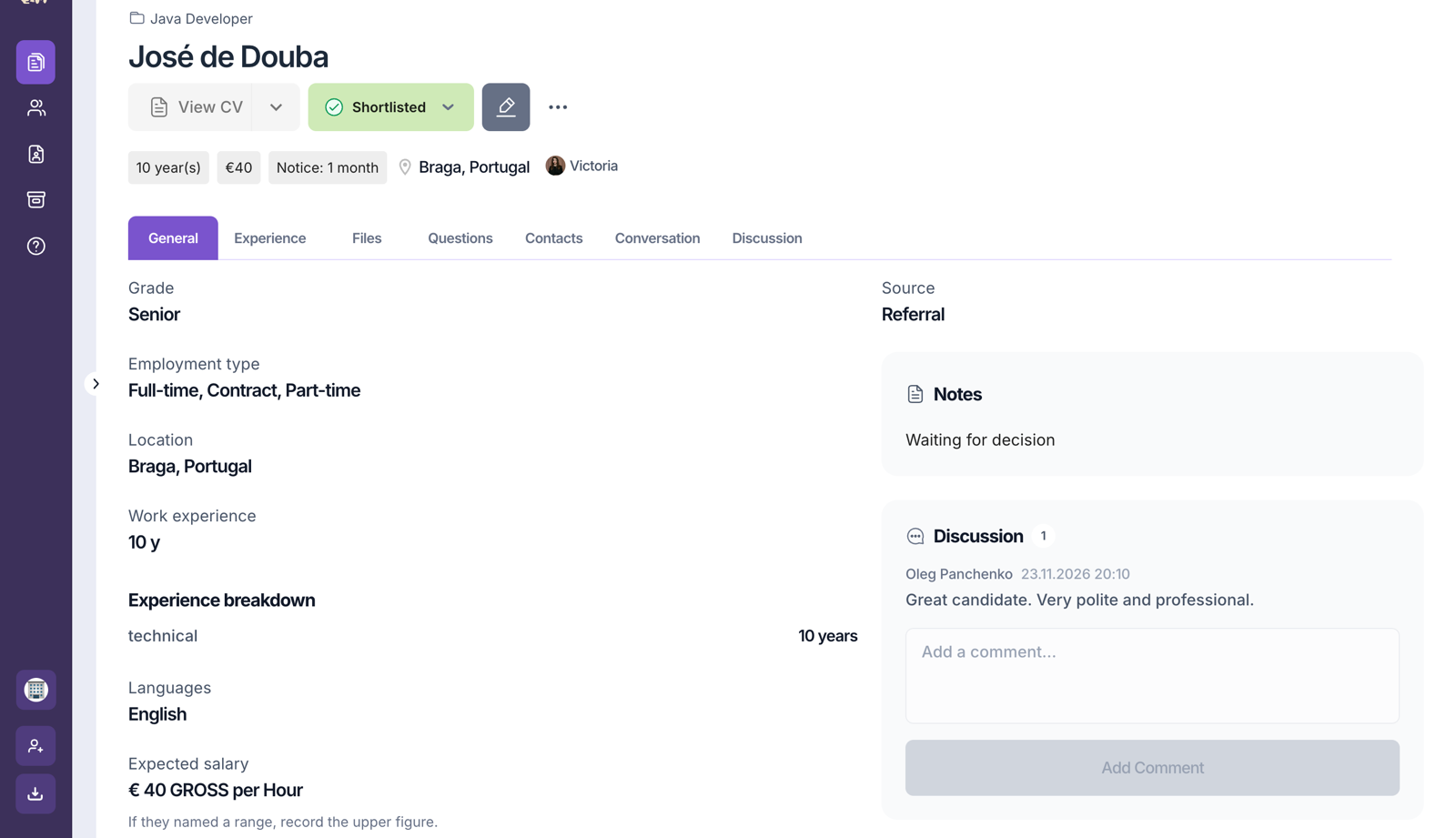
More on the product: Recruiting CRM for sourcing teams.
Glossary
| Term | Meaning |
|---|---|
| Candidate CRM | Software that supports relationships with candidates over time; also called recruiting CRM or talent CRM |
| ATS | Applicant tracking system: software that runs applications and hiring steps for open jobs |
| Sourcing | Finding and contacting people who have not applied |
| Passive candidate | A person who is not looking for a job but may move for the right role |
| Talent pool | A group of candidates kept for future roles, usually by skill, role or readiness |
| Talent community | A group of people who chose to hear from a company or about a field |
| Talent pipeline | Candidates at different stages of readiness for upcoming roles |
| Silver medalist | A finalist who was not hired for a role and is a strong option for the next one |
| Rediscovery | Finding past candidates in your own base for a new role |
| Nurture campaign | Planned messages that keep a pool engaged between roles |
| Rules of engagement | A team's agreement on who owns a candidate and for how long |
| Opt-out | A candidate's request to stop receiving messages, recorded and honored |
| Source of hire | The channel a hired candidate came from: inbound, sourcing, referral or agency |
FAQ
What is a candidate relationship management system?
A candidate relationship management system is software that supports a recruiting team's relationships with candidates over time. It holds profiles, conversations, preferences, talent pools, owners and next steps, and often adds outreach, campaigns and reporting.
What is the difference between a candidate relationship management tool and an ATS?
A candidate relationship management tool primarily manages relationships with people before, during and after any single job. An ATS primarily runs applications for open jobs through interviews and offers. Many products combine both, and many CRMs sync with an ATS.
What are some candidate relationship management examples?
Common candidate relationship management examples: bringing back a past finalist for a new role, a check-in on the date a candidate named, relevant updates to a passive candidate between roles, different messages for different talent pools, and following up with event attendees.
What should recruiters send candidates when there is no open role?
Send what is useful to that person: a check-in tied to their timing, roles that match their stated goals, short market context for their field, an event invitation or a helpful resource. Follow each candidate's preferred topics, channel and frequency.
What are the main types of candidate relationship management software?
The main types of candidate relationship management software are general-purpose CRMs set up for recruiting, recruiting CRMs connected to an ATS, all-in-one recruiting platforms, agency ATS and CRM suites, and sourcing-first team workspaces. Many teams start with spreadsheets before choosing one.
Is a candidate CRM the same as a talent pool?
A talent pool is a group of candidates kept for future roles. A candidate CRM is the system that holds talent pools together with conversations, preferences, owners and next steps for every candidate.
How do you measure candidate relationship management?
Track positive reply rate, re-engagement rate, conversion from talent pools to active hiring, hires from the existing base, follow-ups done on time and opt-out rate, each counted on unique candidates over a fixed period.
Related reading and next step
| Read next | Why |
|---|---|
| Recruiting CRM for sourcing teams | How a sourcing team runs one shared base day to day |
| Recruitment agency software | What an agency of 3 to 10 recruiters needs on the candidate side |
See how sourcing teams keep one shared base: Recruiting CRM for sourcing teams
Sources
| Publisher | Report or page | Sample | Data period | Published | Used for | Last verified |
|---|---|---|---|---|---|---|
| Employ, survey by Zogby Analytics | 2025 Recruiter Nation Report | Online survey of more than 1,200 US HR recruiters and managers | September 2025 | 2025 | CRM use 47% and primary system 16% (p. 12); CRM 51% for higher spending, after AI tools 67% (p. 10 to 11); spreadsheets 35% (p. 12) and 79% for reporting (p. 27) | 16 November 2026 |
| Ashby | The Rise of AI in Job Postings | More than 200,000 qualifying job postings | 2021 to Q2 2026 | 9 July 2026 | Hires for technical roles with AI in the job title: 28% sourced, 37.1% inbound, 9.2% agency | 16 November 2026 |
| European Union | General Data Protection Regulation | Regulation text | Not applicable | 2016 | Lawful basis, transparency and storage limitation | 16 November 2026 |